# GLPI

Mise en place de glpi sur un serveur lap

apt install apache2

apt install php-{mysql,mbstring,curl,gd,xml,intl,ldap,apcu,xmlrpc,zip,bz2} -y

cd /var/www/

mkdir glpi

cd /etc/apache2/sites-available/

cp default-ssl.conf glpi-sssl.conf

[![image.png](https://sioaubusson.fr/uploads/images/gallery/2026-03/scaled-1680-/GuGimage.png)](https://sioaubusson.fr/uploads/images/gallery/2026-03/GuGimage.png)

nano glpi-ssl.conf

[![image.png](https://sioaubusson.fr/uploads/images/gallery/2026-03/scaled-1680-/1z1image.png)](https://sioaubusson.fr/uploads/images/gallery/2026-03/1z1image.png)
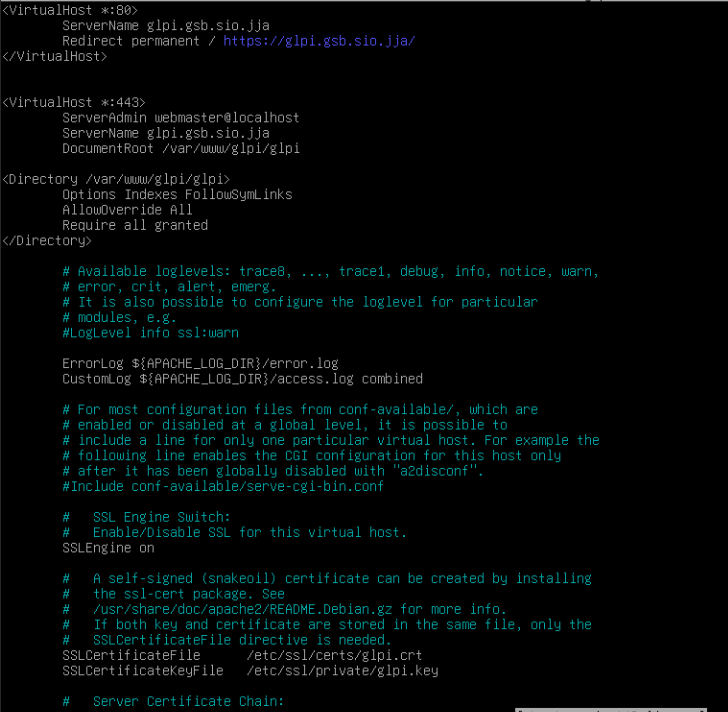
a2enmode ssl

systemctl restart apache2

a2ensite glpi-ssl.conf

systemctl restart apache2

cd /tmp

[![image.png](https://sioaubusson.fr/uploads/images/gallery/2026-03/scaled-1680-/BjNimage.png)](https://sioaubusson.fr/uploads/images/gallery/2026-03/BjNimage.png)

[![image.png](https://sioaubusson.fr/uploads/images/gallery/2026-03/scaled-1680-/XHzimage.png)](https://sioaubusson.fr/uploads/images/gallery/2026-03/XHzimage.png)

[![image.png](https://sioaubusson.fr/uploads/images/gallery/2026-03/scaled-1680-/sodimage.png)](https://sioaubusson.fr/uploads/images/gallery/2026-03/sodimage.png)

[![image.png](https://sioaubusson.fr/uploads/images/gallery/2026-03/scaled-1680-/Ql7image.png)](https://sioaubusson.fr/uploads/images/gallery/2026-03/Ql7image.png)

a2dissite 000-default.conf

systemctl restart apache2

**Pour enlever les erreur annexes avec php cookie etc:**

**Sur la bdd :**

**create database db\_glpi;**

```
GRANT ALL PRIVILEGES ON db_glpi.* TO admindb_glpi@'192.168.90.2' IDENTIFIED BY 'caribou';
FLUSH PRIVILEGES;
```

### Étape 1 : Supprimer le fichier d’installation

**Chemin** :  
<span class="Hzh--zpQr2qZt5NCnH7Jhg==">`/var/www/html/glpi/install/install.php`</span> *(ou <span class="Hzh--zpQr2qZt5NCnH7Jhg==">`/var/www/html/install/install.php`</span> si GLPI est à la racine)*

**Commande (terminal)** :

<div class="Hzh--zpQr2qZt5NCnH7Jhg==" id="bkmrk-bash-copier"><div class="LwsBtml+6Z+ymsEhyY-c7w=="><div>bash</div><div slot="icon-before"><div class="leoIcon svelte-mcxj4j"><div class="icon svelte-mcxj4j">  
</div></div></div><div class="svelte-olvzxz content"><div>Copier</div></div></div></div>```
sudo rm /var/www/html/glpi/install/install.php
```

> ⚠️ Vérifiez d’abord que GLPI est bien installé et fonctionnel avant de supprimer ce fichier.

### Étape 2 : Modifier la configuration PHP (<span class="Hzh--zpQr2qZt5NCnH7Jhg==">`php.ini`</span>)

**Chemin du fichier <span class="Hzh--zpQr2qZt5NCnH7Jhg==">`php.ini`</span>** (dépend de votre serveur) :

- Apache + PHP-FPM : <span class="Hzh--zpQr2qZt5NCnH7Jhg==">`/etc/php/8.x/apache2/php.ini`</span>
- Nginx + PHP-FPM : <span class="Hzh--zpQr2qZt5NCnH7Jhg==">`/etc/php/8.x/fpm/php.ini`</span>  
    *(Remplacez <span class="Hzh--zpQr2qZt5NCnH7Jhg==">`8.x`</span> par votre version de PHP, ex: <span class="Hzh--zpQr2qZt5NCnH7Jhg==">`8.1`</span>, <span class="Hzh--zpQr2qZt5NCnH7Jhg==">`8.2`</span>)*

**Ouvrir le fichier** :

<div class="Hzh--zpQr2qZt5NCnH7Jhg==" id="bkmrk-bash-copier-1"><div class="LwsBtml+6Z+ymsEhyY-c7w=="><div>bash</div><div slot="icon-before"><div class="leoIcon svelte-mcxj4j"><div class="icon svelte-mcxj4j">  
</div></div></div><div class="svelte-olvzxz content"><div>Copier</div></div></div></div>```
sudo nano /etc/php/8.2/apache2/php.ini
```

**Chercher et modifier** :

<div class="Hzh--zpQr2qZt5NCnH7Jhg==" id="bkmrk-ini-copier"><div class="LwsBtml+6Z+ymsEhyY-c7w=="><div>ini</div><div slot="icon-before"><div class="leoIcon svelte-mcxj4j"><div class="icon svelte-mcxj4j">  
</div></div></div><div class="svelte-olvzxz content"><div>Copier</div></div></div></div>```
session.cookie_secure = On
session.cookie_httponly = On
```

> Si les lignes sont commentées (<span class="Hzh--zpQr2qZt5NCnH7Jhg==">`;`</span> au début), retirez le <span class="Hzh--zpQr2qZt5NCnH7Jhg==">`;`</span>.